It’s easy to put together!
My Programme is your personal wishlist for the conference: simply put together your own programme from forums, plenary sessions, get-togethers and more. Not only can you keep track of your selection on the website – you can also add it to your calendar.
This feature is available to registered participants and speakers. You will receive your Wegweiser account, at the latest, together with your admission ticket shortly before the event.
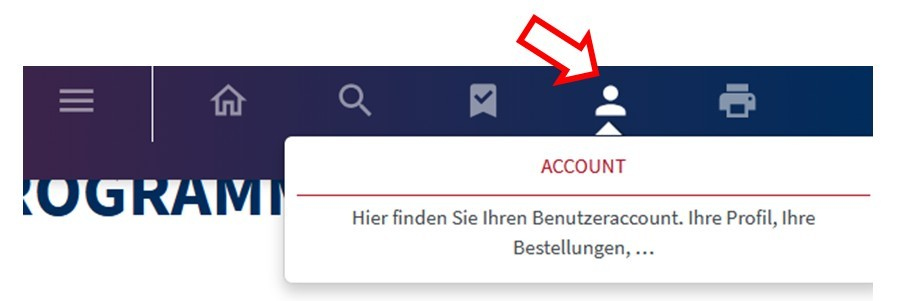
Using the login details we’ve sent you along with your ticket, or which you already have from your ticket booking, you can log in to your account and use ‘My Programme’.
Add or remove sessions
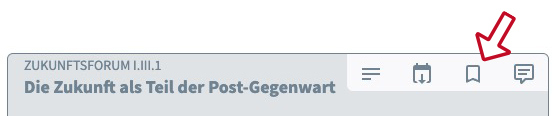
Go to the conference programme via the menu. Click on the bookmark icon to the left of an item in the programme to add it to My Programme. Clicking the icon again will remove the event from your personal selection.
View your personal programme

We have provided a direct link to your personalised programme in the menu. If you cannot see the bookmark there, please log in with your Wegweiser account first.
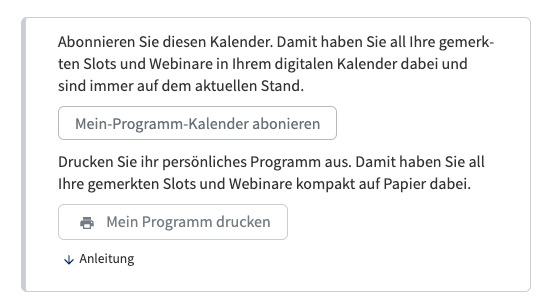
Simply add it to your calendar
You can easily import your personalised programme into your digital calendar (e.g. Outlook, Apple Calendar or Google Calendar). To do this, use the Webcal link in My Programme – this way, you’ll always have an overview of all your selected sessions, including times and any changes.